이번 글에서는 Fluent bit을 통하여 Cloudwatch log group에 log를 저장시켜 보도록 하겠습니다. Fluent Bit은 오픈소스 로그 및 데이터 수집 도구로, 경량화된 아키텍처를 통해 실시간으로 로그를 수집하고 처리하며 다양한 목적지로 데이터를 전송하는 데 사용됩니다. 이번 글에서 사용하는 애플리케이션 코드는 간단한 log를 저장하는 애플리케이션입니다.
# main.py

import os
import logging
from flask import Flask, request

# Ensure the log directory exists
log_dir = "./log"
os.makedirs(log_dir, exist_ok=True)

# Set up logging
log_file = os.path.join(log_dir, "app.log")
logging.basicConfig(
    filename=log_file,
    level=logging.INFO,
    format="%(asctime)s - %(levelname)s - %(message)s",
)

# Create Flask application
app = Flask(__name__)

# Middleware to log access requests
@app.before_request
def log_request():
    log_message = (
        f"{request.remote_addr} - {request.method} {request.path} - "
        f"User-Agent: {request.headers.get('User-Agent', 'Unknown')}"
    )
    logging.info(log_message)

@app.route("/")
def home():
    return "Welcome to the Access Logging Example!"

@app.route("/health")
def health():
    return {"status": "OK"}

# Run the Flask app
if __name__ == "__main__":
    app.run(host="0.0.0.0", port=8080)
1. Fluent-Bit 설치
먼저 fluent bit을 설치해야 합니다. 현재 amazon linux 2023에서는 fluent bit을 설치하기 위해서 curl 명령어를 사용해야 합니다.
curl https://raw.githubusercontent.com/fluent/fluent-bit/master/install.sh | shfluent bit을 설치하였다면 fluent bit을 실행시켜야 합니다.
sudo systemctl enable --now fluent-bit.service2. Fluent-Bit 설정 수정
Clodwatch로 log를 전송하기 위해선 Fluent-bit 설정 파일을 수정해야 합니다. 아래 명령어처럼 /etc/fluent-bit 경로에 존재하는 fluent-bit.conf라는 파일을 수정해야 합니다.
cd /etc/fluent-bit
sudo vim fluent-bit.conf
fluent-bit.conf라는 파일에 밑으로 내리다 보면 INPUT, OUTPUT 부분이 존재합니다. 저희는 이 부분을 수정하여 cloudwatch에 보내야 합니다. 먼저 애플리케이션에서 Access log를 저장하는 경로인 /log/app.log로 INPUT을 설정해야 합니다.
[INPUT]
    Name tail
    Path /home/ec2-user/app/log/app.log
    Tag access_log
위와 같이 수정하였다면 이제 OUTPUT을 활용하여 cloudwatch로 전송해야 합니다. 하지만 전송할 때 health 경로에 대한 로그는 저장하고 싶지 않으시다면 아래와 같이 FILTER를 활용할 수 있습니다.
[FILTER]
    Name grep
    Match access_log
    Exclude log /health

[OUTPUT]
    Name cloudwatch_logs
    Match access_log
    region ap-northeast-2
    log_group_name fluent-bit-cloudwatch
    log_stream_prefix from-fluent-bit-
    auto_create_group true
이제 설정파일을 전부 수정하였다면 Fluent-Bit을 동작을 재시작해야 합니다.
sudo systemctl restart fluent-bit3. 동작 테스트
주의사항으로는 실행시키는 instance에 cloudwatch에 대한 권한이 존재해야 합니다.
동작 테스트를 위해 먼저 애플리케이션을 실행시킵니다. 애플리케이션을 실행시켰다면 curl 명령어를 사용해 access log를 발생시킵니다.
또한 FILTER도 정상적으로 적용이 되었는지 확인을 위해 /health 경로로도 요청을 보냅니다.
curl localhost:8080/
curl localhost:8080/health
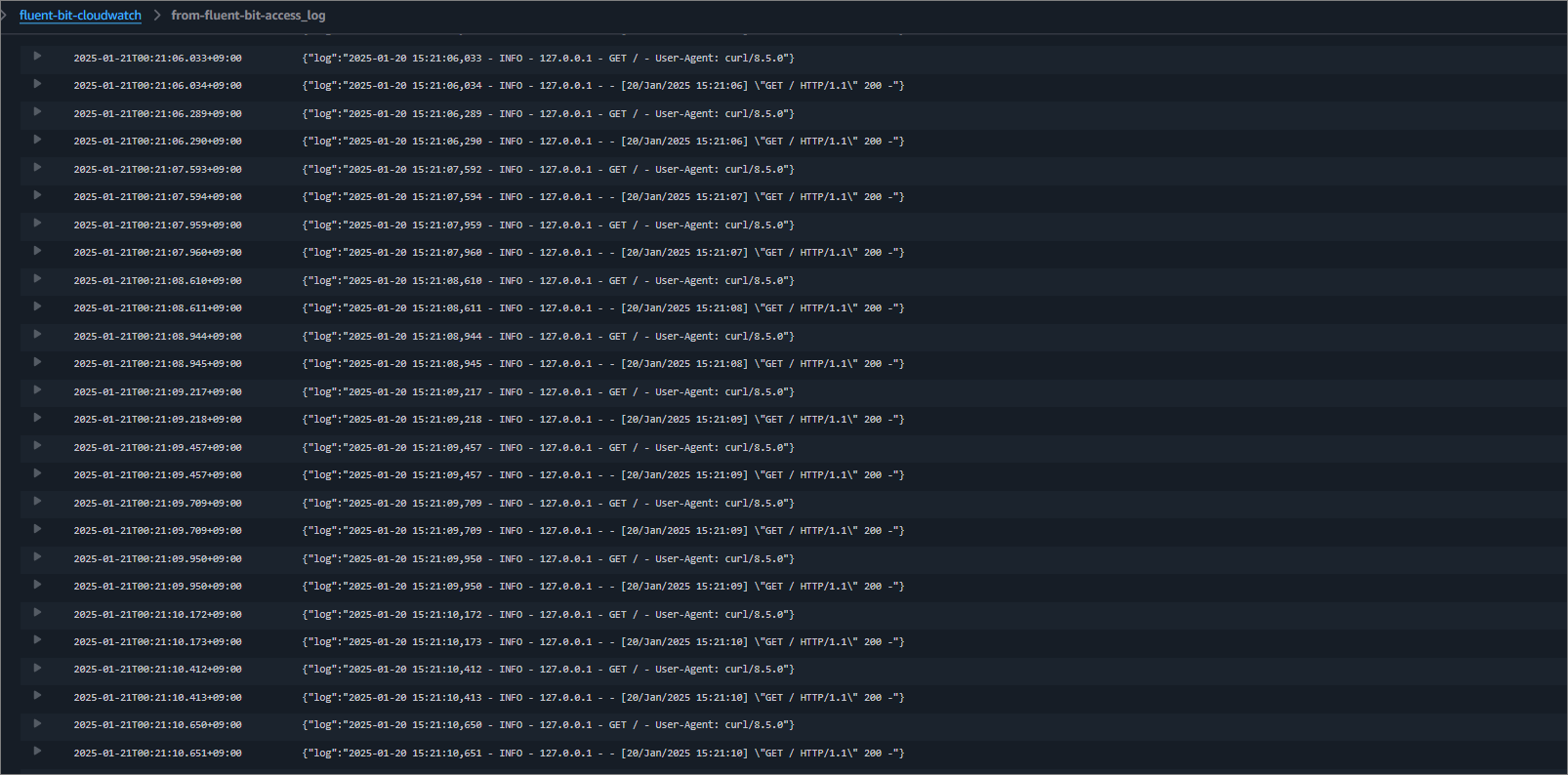
정상적으로 요청이 갔다면 cloudwatch에 fluent-bit-cloudwatch라는 log group이 생기게 되고, from-fluent-bit-access_log이라는 stream이 생성됩니다. stream에 들어가서 log를 보게 되면 / 경로에 대한 log 밖에 존재하지 않습니다.

마무리
오늘은 Fluent-Bit을 사용하여 cloudwatch에 Access log를 전송해봤습니다. INPUT 부분에서 /log/app.log만 적었다가 에러만 찾고 있었던 적도 있고 권한이 없어서 에러 뜬 적도 있고 문법을 틀려서 에러가 떴던 적도 있습니다. Fluent-Bit을 사용하실 때에는 공식홈페이지에 자세한 설명이 나와있으니 참고하여 사용하시길 바랍니다. 이번 글은 여기서 마치겠습니다. 읽어주셔서 감사합니다.
Fluent Bit v3.2 Documentation | Fluent Bit: Official Manual
High Performance Telemetry Agent for Logs, Metrics and Traces
docs.fluentbit.io
'AWS Service' 카테고리의 다른 글
| [AWS Service] Amazon Macie를 사용하여 S3 데이터 분석 (0) | 2025.01.21 |
|---|---|
| [AWS Service] S3에 저장된 log Athena로 분석 (0) | 2025.01.21 |
| [AWS Service] Openssl을 사용해서 Client VPN 연결 (0) | 2025.01.03 |
| [AWS Service] AWS App Runner로 Application 배포 (2) | 2024.10.22 |
| [AWS nuke] AWS nuke를 사용해보자 (5) | 2024.10.21 |